
Tabs
Tabs fail more frequently than almost any other bespoke widget on the web. While pointer click toggling is trivial to construct, roving tabindex keyboard navigation and bidirectional WAI-ARIA synchronization are frequently omitted entirely, leading to broken assistive technology contracts.
Live Demo
Tab into the tablist below, then explore navigating using the Left and Right arrow keys (← / →):
Visual Variant (Filled)
Visual selection treatments—whether utilizing sliding underlines or filled background pills—execute the identical initTabs() script logic. Only CSS presentation styles differ.
Keyboard Interaction
| Key Interaction | Expected Behavioral Contract |
|---|---|
Tab | Enter the tablist in a single stop; exit to the next interactive page element in a single stop |
Shift + Tab | Exit the tablist backward to the previous interactive page element in a single stop |
← / → (Horizontal) | Move keyboard focus and active selection to the previous / next tab |
Home / End | Jump focus directly to the first / last tab in the list |
Pointer Interactions
| Pointer Action | Expected Behavioral Contract |
|---|---|
| Click / Tap Tab | Selects the target tab and displays the corresponding panel (producing identical results to keyboard activation) |
Structure
Rules
- Give tabs and panels their roles and link them both ways MUSTUI-R15
- Use
role="tablist",role="tab"androle="tabpanel"; each tab'saria-controlspoints to its panel and each panel'saria-labelledbypoints to its tab. Screen readers announce the number of tabs, the selected tab and the panel's name. - Check:
TAB-01TAB-01Tab and panel linking✕ NGTab and panel are not linked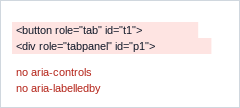 ✓ OKTab and panel point to each other
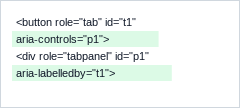
- Put only the selected tab in the
Taborder MUSTUI-R16 - The selected tab has
tabindex="0"and the otherstabindex="-1"(roving tabindex). OneTabpress enters the tab list and the next one leaves it. - Check:
TAB-02TAB-02Tab key in the tab list✕ NGTakes 3 Tab presses to get out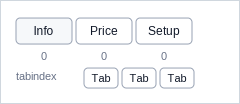 ✓ OKOne Tab in, the next Tab out
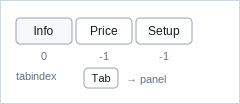
- Move between tabs with the arrow keys and
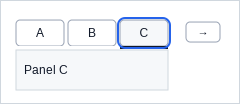
Home/EndMUSTUI-R17 ←→(↑↓for vertical tabs) move focus and selection to the previous or next tab, andHomeEndto the first or last. Even with many tabs, few key presses reach the one users want.- Check:
TAB-03TAB-03Arrow keys on tabs✕ NGFocus moves but the panel stays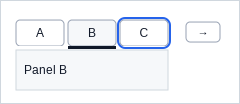 ✓ OKFocus and panel switch together
- Hide unselected panels with the
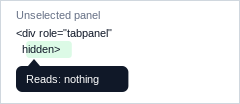
hiddenattribute MUSTUI-R18 - A panel hidden only with a CSS class can still be read out. The
hiddenattribute removes it from both the screen and screen readers. - Check:
TAB-04TAB-04Hiding unselected panels✕ NGHidden panel is still read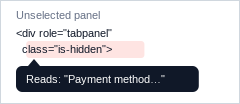 ✓ OKhidden also hides it from readers
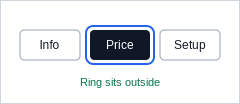
- Keep the focus indicator visible on the selected tab MUSTUI-R19
- When focus lands on a tab that is filled or underlined to show selection, the indicator must still stand out from its background. The focus position does not get lost in the selection style.
- Check:
TAB-05TAB-05Focus on the selected tab✕ NGFocus is invisible when selected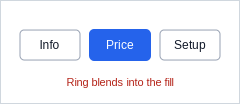 ✓ OKFocus stays visible when selected
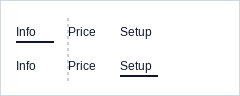
- Do not shift the tabs when the selection changes SHOULDUI-R20
- Bolding only the selected tab changes its width and moves every tab after it. Keep the weight the same, or absorb the width change with padding.
- Check:
TAB-06TAB-06Tabs do not shift✕ NGFollowing tabs shift on select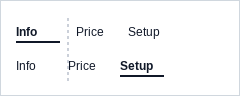 ✓ OKPositions do not move
Implementation (Selection Follows Focus)
A complete, production-grade reference satisfying all criteria above:
View Source Code (HTML Markup and JavaScript Module)
html
<div class="tabs-wrap">
  <div role="tablist" aria-label="Account settings">
    <button role="tab" id="tab-profile" aria-selected="true" aria-controls="panel-profile">
      Profile
    </button>
    <button role="tab" id="tab-billing" aria-selected="false" aria-controls="panel-billing" tabindex="-1">
      Billing
    </button>
  </div>
  <span class="tab-indicator" aria-hidden="true"></span>
</div>
<div role="tabpanel" id="panel-profile" aria-labelledby="tab-profile">…</div>
<div role="tabpanel" id="panel-billing" aria-labelledby="tab-billing" hidden>…</div>
javascript
// modules/tabs.js
export function initTabs(root) {
  const tabs = [...root.querySelectorAll('[role="tab"]')]
  const panels = tabs.map((tab) => document.getElementById(tab.getAttribute('aria-controls')))
  const indicator = root.querySelector('.tab-indicator')

  function moveIndicator(tab) {
    if (!indicator || !tab) return
    indicator.style.left = `${tab.offsetLeft}px`
    indicator.style.width = `${tab.offsetWidth}px`
  }

  function select(index) {
    tabs.forEach((tab, i) => {
      const active = i === index
      tab.setAttribute('aria-selected', String(active))
      tab.tabIndex = active ? 0 : -1
      if (panels[i]) {
        panels[i].hidden = !active
      }
    })
    tabs[index].focus()
    moveIndicator(tabs[index])
  }

  tabs.forEach((tab, index) => {
    tab.addEventListener('click', () => select(index))
    tab.addEventListener('keydown', (event) => {
      const last = tabs.length - 1
      if (event.key === 'ArrowRight') {
        select(index === last ? 0 : index + 1)
      } else if (event.key === 'ArrowLeft') {
        select(index === 0 ? last : index - 1)
      } else if (event.key === 'Home') {
        select(0)
      } else if (event.key === 'End') {
        select(last)
      } else {
        return
      }
      event.preventDefault()
    })
  })

  const activeTab = tabs.find((tab) => tab.getAttribute('aria-selected') === 'true')
  if (activeTab) {
    moveIndicator(activeTab)
  }
}- Return to Keyboard & ARIA Patterns