
Menu Button
A menu button is an interactive pattern used for account menus, table row action dropdowns ("⋯"), and lists of actionable commands rather than form values.
Because there is no native HTML element for this pattern, teams must implement the WAI-ARIA menu / menuitem specification, ensuring strict keyboard event handling and focus restoration.
Live Demo
Focus the trigger button below and press the Down arrow key (↓) to expand the menu and navigate through items using the Arrow keys:
Keyboard Interaction
| Key Interaction | Expected Behavioral Contract |
|---|---|
Tab | Focus the trigger button; closes the menu if previously open, advancing naturally to the next page element |
↓ (Down Arrow) | Expand the menu and place keyboard focus on the first menu item |
↑ / ↓ | Cycle focus backward and forward between menu items |
Home / End | Jump focus immediately to the first or last menu item |
Esc | Close the menu and restore focus to the trigger button |
Enter / Space | Execute the focused menu item and close the menu |
Pointer Interactions
| Pointer Action | Expected Behavioral Contract |
|---|---|
| Click Trigger | Toggles the expanded state of the menu |
| Click Menu Item | Executes the selected action and closes the menu (matching the outcome of keyboard Enter) |
| Click Outside Menu | Dismisses the open menu without executing any action |
Structure
Rules
- Give the menu button
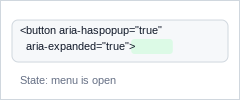
aria-haspopupand anaria-expandedthat follows its state MUSTUI-R28 - Add
aria-haspopup="true"and switcharia-expandedbetweentrueandfalseas the menu opens and closes. Screen readers announce that the button opens a menu, and whether it is open. - Check:
MNB-01MNB-01aria-expanded follows the menu✕ NGStill false when open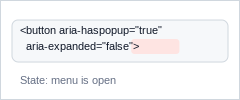 ✓ OKFollows open and closed
- Open the menu and move through items with the arrow keys; run an item with
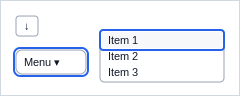
EnterorSpaceMUSTUI-R29 ↓on the trigger opens the menu and moves to the first item,↑↓cycle through the items, andHomeEndgo to the first and last. Every item can be chosen with the keyboard alone.- Check:
MNB-02MNB-02Menu keyboard keys✕ NGDown does not open it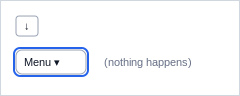 ✓ OKOpens, first item focused
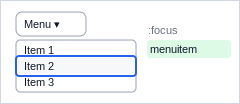
- Move real DOM focus to the menu items MUSTUI-R30
- Focus each
<button role="menuitem">instead of pointing at it virtually witharia-activedescendant. The focus position is conveyed reliably both on screen and to screen readers. - Check:
MNB-03MNB-03Focus on menu items✕ NGFocus stays on the trigger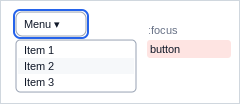 ✓ OKThe item gets DOM focus
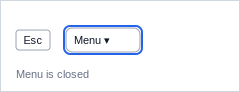
- Close the menu on
Esc,Taband a click outside MUSTUI-R31 Esccloses it and returns focus to the trigger;Tabcloses it and moves on to the next element. An open menu never lingers in the way of other actions.- Check:
MNB-04MNB-04Focus after Esc closes✕ NGFocus does not return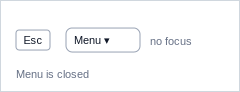 ✓ OKFocus returns to the trigger
Implementation
A complete, production-grade reference module:
View Source Code (HTML Markup and JavaScript Module)
html
<button id="menu-trigger" aria-haspopup="true" aria-expanded="false" aria-controls="menu">
  Actions
</button>
<ul id="menu" role="menu" aria-labelledby="menu-trigger" hidden>
  <li role="none"><button type="button" role="menuitem" tabindex="-1">Edit</button></li>
  <li role="none"><button type="button" role="menuitem" tabindex="-1">Duplicate</button></li>
  <li role="none"><button type="button" role="menuitem" tabindex="-1">Delete</button></li>
</ul>
javascript
// modules/menu-button.js
export function initMenuButton(trigger, menu) {
  const items = [...menu.querySelectorAll('[role="menuitem"]')]

  function open(focusIndex = 0) {
    menu.hidden = false
    trigger.setAttribute('aria-expanded', 'true')
    items[focusIndex].focus()
  }

  function close() {
    menu.hidden = true
    trigger.setAttribute('aria-expanded', 'false')
    trigger.focus()
  }

  trigger.addEventListener('click', () => (menu.hidden ? open() : close()))
  trigger.addEventListener('keydown', (event) => {
    if (event.key === 'ArrowDown') {
      event.preventDefault()
      open(0)
    }
  })

  items.forEach((item, index) => {
    item.addEventListener('click', close)
    item.addEventListener('keydown', (event) => {
      const last = items.length - 1
      if (event.key === 'ArrowDown') {
        items[index === last ? 0 : index + 1].focus()
      } else if (event.key === 'ArrowUp') {
        items[index === 0 ? last : index - 1].focus()
      } else if (event.key === 'Home') {
        items[0].focus()
      } else if (event.key === 'End') {
        items[last].focus()
      } else if (event.key === 'Escape') {
        close()
      } else if (event.key === 'Tab') {
        menu.hidden = true
        trigger.setAttribute('aria-expanded', 'false')
        return
      } else {
        return
      }
      event.preventDefault()
    })
  })

  document.addEventListener('click', (event) => {
    if (!menu.hidden && !menu.contains(event.target) && event.target !== trigger) {
      menu.hidden = true
      trigger.setAttribute('aria-expanded', 'false')
    }
  })
}- Return to Keyboard & ARIA Patterns